
Edit a product
Edit a product's icon, color, name, team access, allocated devices, and monitoring settings, or archive and delete it.
You can edit any product to update its details, add or remove teams and devices, or configure monitoring settings.
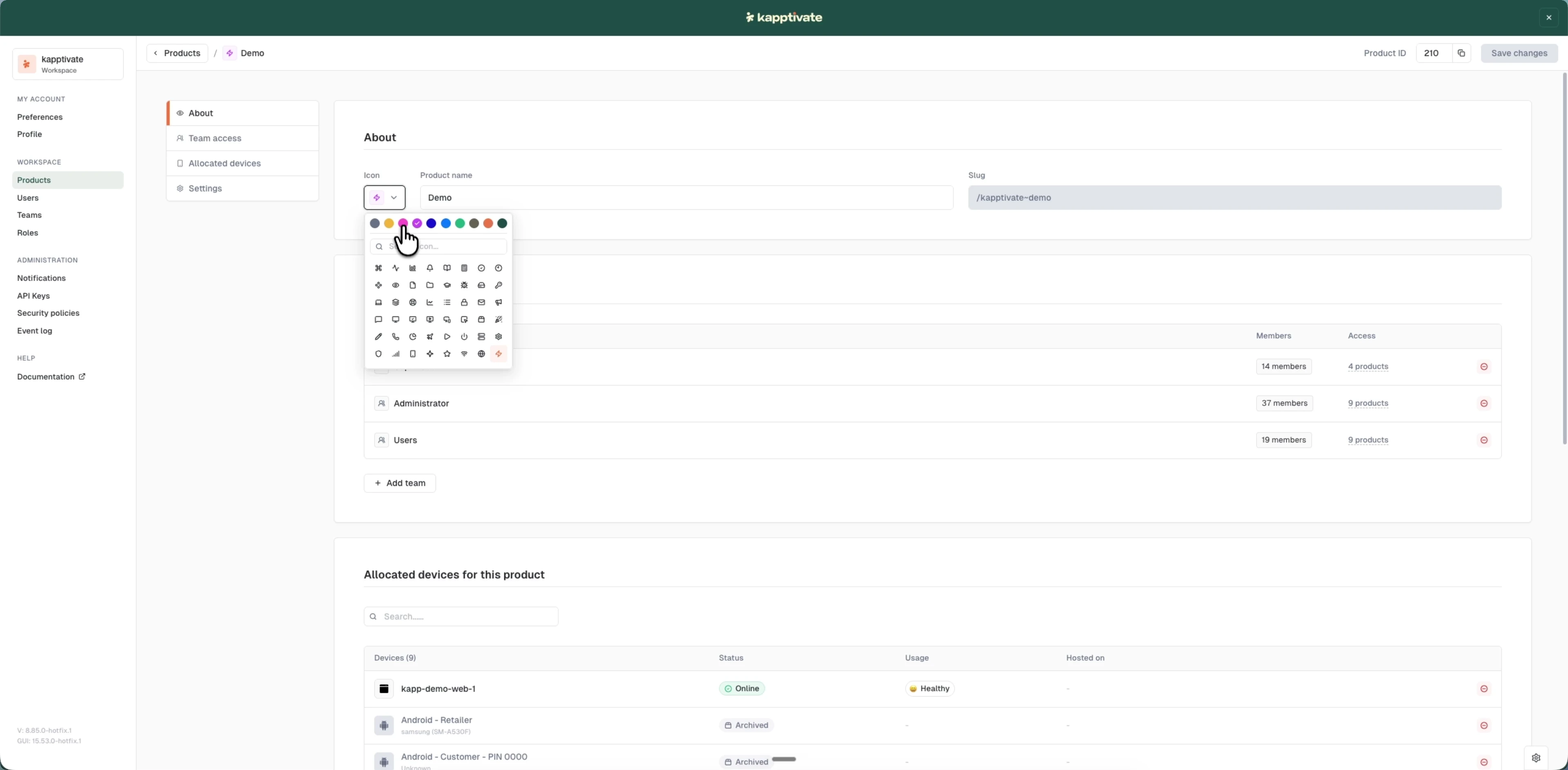
Edit a product
- Go to Administration > Products
- Click the product name to open the edit page
- Make your changes in the relevant sections:
- About: change the icon, color, or product name
- Team access: add or remove teams with access to this product
- Allocated devices: associate smartphones, SIM cards, and web agents with the product
- Settings: enable monitoring and set the aggregation interval
- Click "Save changes"
Your product slug is set when you create the product and cannot be changed. The slug is a URL-friendly identifier used in product-specific URLs.
Archive or delete a product
The Settings tab has two actions at the bottom for removing a product from active use:
- Archive product: keeps the product and its data but moves it out of the active list. Archived products drop to the end of the products list and stay accessible, so you can restore or reference them later. Use this when a product is no longer tested but you want to keep its history.
- Delete product: permanently removes the product. Use this only when you're sure the product and its configuration are no longer needed.
Deleting a product is permanent and cannot be undone. Archive instead if you might need the product or its data again.
Last updated on